
Whether you have an on-site task and are looking for a solution or an initial diagnosis, hold a technology and want to validate its applicable scenarios, or plan site visits and industry engagement — you can start from the YouJi Nexus platform.
Open app.youjinexus.com, think about the problem you most need to solve right now, then choose an entry point.
One distinction first: scenario needs and cases are the entry; YouJi sells judgment, matching and validation services around a concrete task — not the information itself. The pilot prioritizes factories, parks and site owners.
When reading public materials, keep three types apart: real demand leads (with deadlines/status; expired = closed), application cases (conditions and stage; not an owner mandate or third-party acceptance), and proposed blueprints (task framing; not a claim of existing procurement). Use CTAs such as “Assess my site” or “Check project fit”, never “Buy now”.
If the links in this article do not jump directly, follow the paths below on the platform, or open the platform URL in your browser.
01 Three entry points: what problem does each solve?
-
Scenario Opportunities: browse public demand leads and calls — mainly for suppliers to check project fit (not a single “find deals” button).
View tasks, regions and current stages, and note the scenario numbers relevant to you; to keep following, subscribe to scenario opportunity updates.
-
Blueprints & Cases (site-owner priority): compare cases and proposed blueprints with your own conditions, then open “Assess my site / Scenario Diagnosis”.
Read the materials against your own task and list missing conditions; when you need a go / no-go judgment, open Assess my site. You may also register interest through "Get blueprint & case updates".
-
Scenario Matching & Events: advance cooperation through site studies, supply–demand matching and themed exchanges.
Check themes and event status, then apply to join, invite a visit or propose co-hosting as needed.
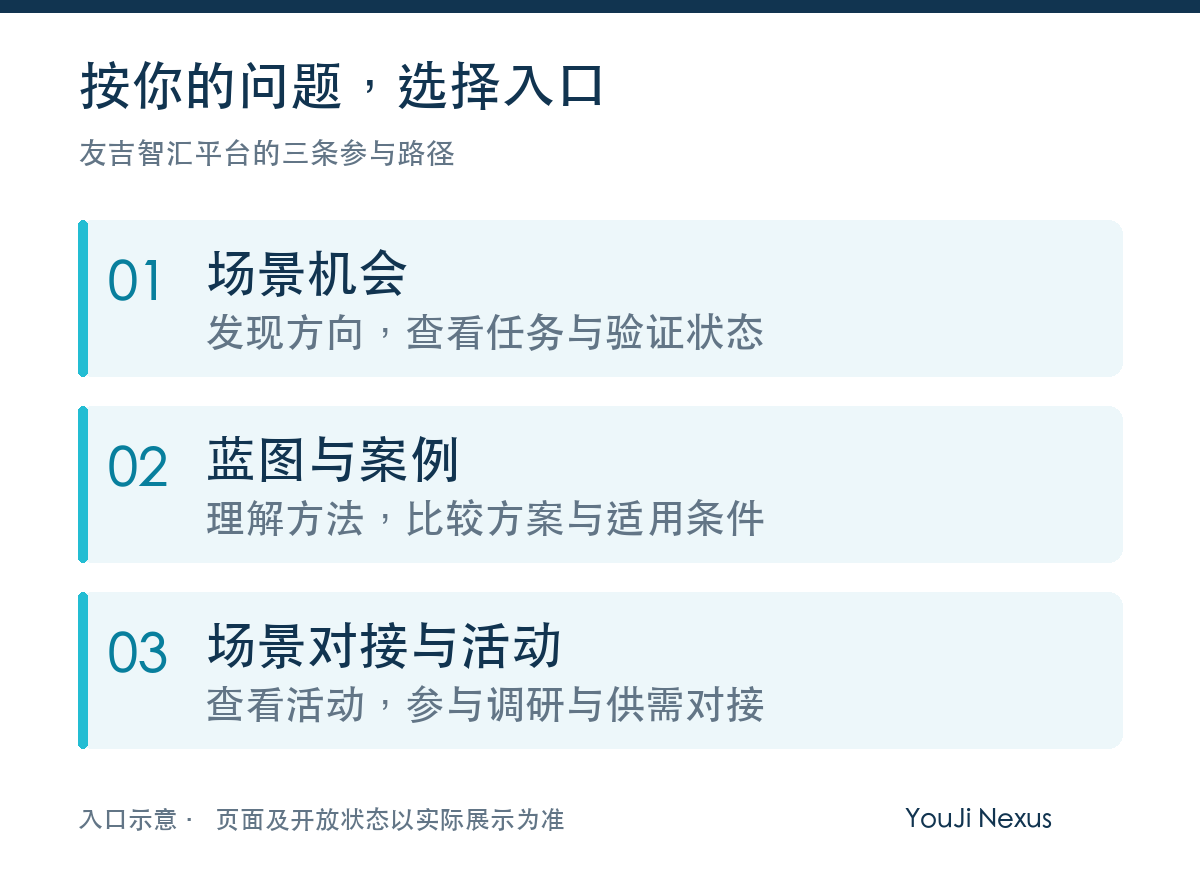
Choose the entry point that matches your question; there is no need to browse every section first.
02 Reading scenario opportunities: task and stage together
Enter Scenario Opportunities and view scenario summaries for relevant industries and regions.
Path: Platform home → Scenario Opportunities → View scenario opportunities.
When reading, confirm in turn: what the task is, what capabilities it needs, what evidence exists now, and which conditions remain to be verified.
Scenario summaries help you judge which directions are worth further verification. When you find a relevant task, note the scenario number, view the linked materials, and state your own questions or capabilities.
To keep following, register your email and regions of interest through "Subscribe to scenario opportunity updates". The page notes that you will be asked to confirm your email before notifications are activated.
03 Reading blueprints & cases: five things to look for
Enter Blueprints & Cases: check the material type, date and stage first, then read the content.
Path: Platform home → Blueprints & Cases → View blueprints & cases.
- Task and operating conditions: where and what work is done.
- Solution and alternatives: why this combination, and what other options exist.
- Validation scope: which part is tested first, and how results are judged.
- Delivery conditions: how interfaces, training, maintenance and responsibilities are arranged.
- Evidence status: what comes from public research, and what has been confirmed by project participants.
After reading, list the site conditions that differ from your own task, the capabilities to understand further, and the questions you want to validate.
To keep following, register your interest through "Get blueprint & case updates". The page notes that you will be asked to confirm your email before notifications are activated.
04 Finding technology capabilities: search by task first, then narrow down
In the "Find supply chain & solutions" search on the platform home, enter a product, technology, task or company name; you can also start from popular terms such as "inspection" and "material handling".
Within Find Solutions, filter step by step by the type, capability, form, task, operating condition and industry criteria provided on the page.
Path: the search box on the platform home; or platform navigation → Find Solutions.
On your first search you need not select all criteria. Find the relevant task first, then add the necessary operating conditions; if results are too few, check whether the filters are too restrictive.
After finding relevant solutions, focus on applicable operating conditions, application materials and local service conditions, and note the questions needing further confirmation.
Through country hubs, you can view public company and scenario profiles for opened regions; through Insights, you can add industry context, then return to your own task to judge applicability.
05 Ready to advance a specific project? Enter Scenario Deployment Services
The three home-page entries help you find leads, understand methods and join exchanges. With a specific task in hand, you can also use "Scenario Deployment Services" to choose diagnosis, validation or research-visit matching.
Path: Platform home → Scenario Deployment Services → choose the corresponding service. You can also scroll down on the platform home to find the "Scenario Deployment Services" section.
Basic Scenario Diagnosis: map problems and candidate solutions first
For scenario demand owners who have on-site problems but are not yet clear about technology fit conditions, candidate solutions or information gaps.
Enter "Scenario Diagnosis", describe the industry, site task, operating conditions, pain points and expected outcomes, supplement industry, operating-condition and region information as needed, then click "Start Diagnosis". The page provides a free self-service basic diagnosis tool that returns a six-dimension score, a shortlist of candidate solutions and improvement suggestions.
What to prepare: one specific scenario description. State unclear conditions as they are, and avoid replacing the task with "we want intelligence".
Next step: use the screening results to add site conditions and capability evidence; for deeper analysis, discuss the scope and cost of a custom in-depth diagnosis separately. The screening report is a starting point for discussion; actual fit still requires on-site verification.
PoC Validation & Rental: test the solution in a limited scope first
For demand owners and technology companies that already have candidate solutions and want to verify results under agreed conditions before deciding on further investment.
Enter "PoC & Rental" to learn about the validation process and describe your task through "Submit a scenario need to start a PoC evaluation". You can also raise short-term equipment rental needs; equipment, region and supporting conditions are confirmed in further communication.
What to prepare: the site task, the current method, the capabilities to validate, the site and time you can provide, and the improvements you want to measure.
Next step: define the validation scope, acceptance metrics, participant responsibilities and cost arrangements, and start execution only after confirmation. The data and conclusions from validation are the basis for judging the follow-up solution and implementation conditions.
Enterprise Research, Tech Site Visits & Matching: see sites with decision questions in hand
For companies, parks, government trade and industry organizations in China and overseas that want to understand technologies, actual application sites and delivery capabilities. Governments and parks can also set specific visit objectives around industry cooperation, technology introduction or investment promotion.
Enter "Enterprise Research & Tech Site Visits", view the "Enterprise research, tech site visits and matching plan", and click "Submit a visit request".
What to prepare: the visit purpose, industries and technologies of interest, tasks to solve, participating organizations, planned timing and budget range.
Next step: clarify the objectives first, then screen candidate scenarios and companies, and confirm the visit scope, hosting conditions and costs; on-site exchanges produce factual records, question lists and follow-up validation suggestions. Itineraries and meeting arrangements are subject to the parties' confirmation.
If you represent a technology company, park or service organization and can offer an application site, hosting or solutions, click "Submit hosting / solution capability" on the same page and describe the scenarios you can show, your technical capabilities, hosting conditions and service scope.
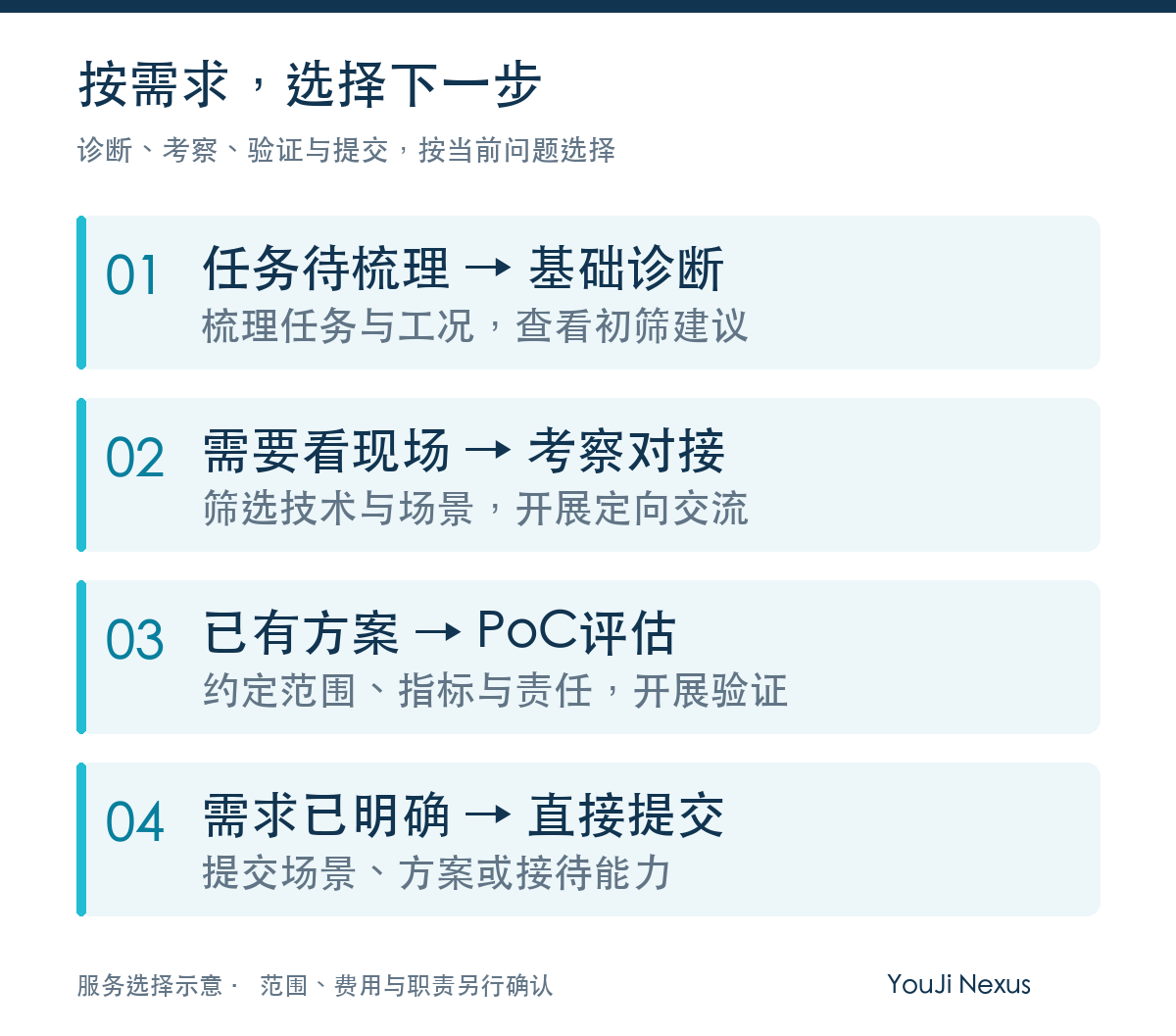
Choose the service that matches your current question; you need not complete all steps in order. Specific work scope, costs and responsibilities are confirmed in further communication.
06 Joining events: theme first, then arrangements
Enter Scenario Matching & Events to view site-study, supply–demand matching and themed-exchange directions.
Path: Platform home → Scenario Matching & Events → View events.
"Collecting expressions of interest" means the specific time, city or arrangements are still to be confirmed. Participants, fees and eligibility follow the corresponding event description and subsequent confirmation.
The page provides entries such as "Register / Apply to join", "Invite a visit", "Co-host" and "Submit a scenario need". After choosing one, briefly describe your organization, region, relevant tasks and the questions you want to discuss.
After submission, participation arrangements are confirmed through follow-up communication. To keep following studies and events, register your regions and industries of interest; the page notes that you will be asked to confirm your email before notifications are activated.
When reading materials, check the stage first
Scenario summaries provide cooperation leads; reference blueprints explain task breakdowns and validation approaches; cases should be read together with their sources, implementation scope and acceptance status.
Company and solution profiles help you understand candidate capabilities; actual fit requires on-site verification. Budgets, procurement arrangements and service acceptance conditions are confirmed in further communication.
07 Submitting a need: one paragraph, task made clear
Path: the "Submit a Scenario" or "Submit a Solution" buttons on the platform pages.
If you represent a factory, park or other scenario demand owner, enter Submit a Scenario and fill in the basic information required on the page. A scenario description can be organized like this:
In which region and on which site we complete which task using which method; what problems we currently face, what we hope to improve, and what we want to discuss next.
If you represent a technology company, enter Submit a Solution and describe your product form, core capabilities, applicable operating conditions and existing applications. State validated and still-testing capabilities separately, and provide checkable materials for cases where possible.
For the first submission, the necessary information is enough; the scope for exchanging detailed site materials and non-public documents is confirmed in later communication.
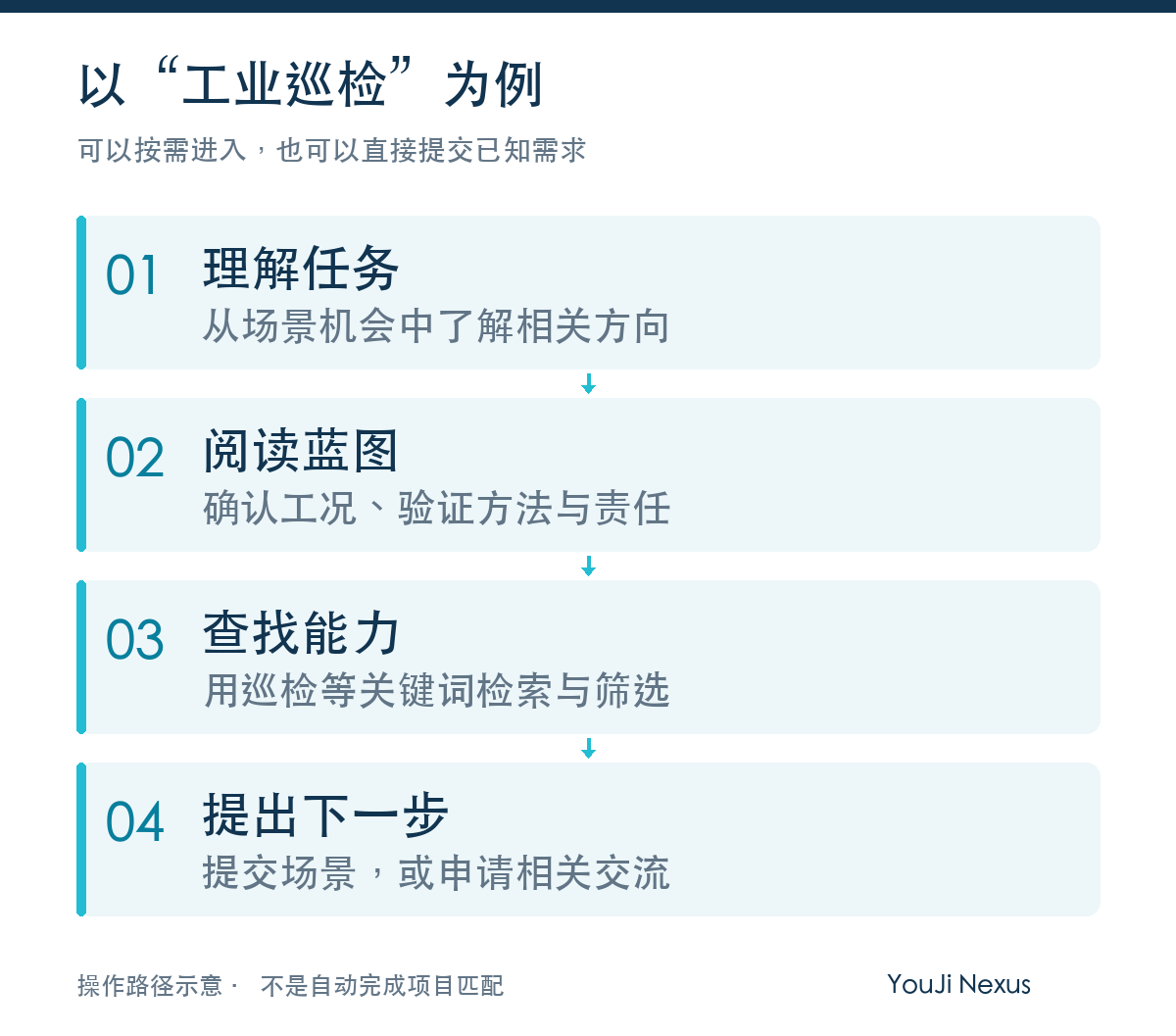
This is a reference path. Readers who already know their task and conditions can also submit a need directly.
Frequently asked questions
-
Can I start without a complete requirement?
You can start by reading the materials. When you are ready to talk, describe your task, site, current method and open problems as fully as possible; state conditions you do not yet know as they are.
-
How does the basic diagnosis differ from project services?
The basic diagnosis provides an initial score, candidate solutions and suggestions. For further in-depth analysis, site visits or a PoC, discuss the specific objectives, scope, costs and responsibilities first, then confirm the arrangements.
-
Are scenario opportunities chargeable?
Browsing scenario opportunities is free. Base search, submission of scenario needs or solutions, and initial matching are free; custom in-depth diagnosis, targeted matching, PoC and delivery services are subject to agreed fees. We do not promise orders and we do not sell lists.
-
What if I cannot find a matching scenario?
Reduce the filters first, change your task terms, or submit a scenario describing the information gap. No search result does not mean the task has been proven infeasible.
Now, start from your question
First state your region, site, task and current method, then add the results you hope to improve. Conditions not yet clear can be listed as to-be-confirmed items.
The YouJi Nexus platform helps you discover relevant leads, understand validation methods, and take the next step through scenario diagnosis, PoC evaluation, enterprise research and tech site visits, need submission and event engagement.
To find a direction, read opportunities and blueprints; to advance, choose “Assess my site”, visits or validation by task — you buy the service, not the information itself.
Open the YouJi Nexus platform: app.youjinexus.com
This guide is compiled from the platform's public pages; service entries were re-verified on September 30, 2026. Page content, events and notification services are continuously updated; the latest display and subsequent confirmations prevail.